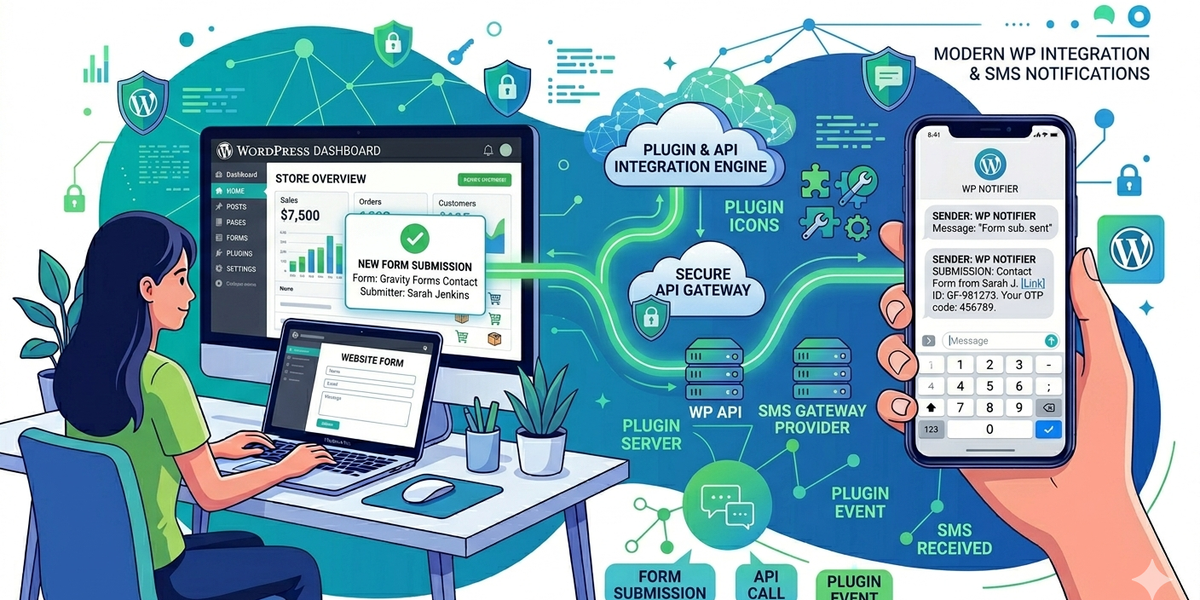
SMS messaging is a powerful way to improve communication on WordPress websites. Whether you want to send OTP verification codes, contact form alerts, order notifications, or appointment reminders, integrating WordPress with DataFlows SMS API allows you to automate messaging directly from your website.
In this guide, we’ll explain how to integrate WordPress with DataFlows SMS API and common use cases for businesses and developers.
Why Use SMS with WordPress?
WordPress powers millions of websites worldwide, and SMS integration helps businesses communicate with users instantly.
SMS works well because:
• Messages are delivered instantly • High open and response rates • Works on all mobile devices • Ideal for notifications and alerts
This makes SMS perfect for customer communication and automation.
Common WordPress SMS Use Cases
Businesses commonly use WordPress SMS integration for:
• OTP verification codes • Contact form notifications • WooCommerce order alerts • Appointment reminders • User registration verification • Marketing campaigns • Event notifications
Many WordPress businesses use SMS to improve engagement and reduce missed communication.
How the WordPress Integration Works
The integration connects your WordPress website to the DataFlows SMS API.
Typical workflow:
- A user submits a form or triggers an action
- WordPress sends an API request
- DataFlows processes the SMS
- The customer receives the message instantly
This allows fully automated SMS communication directly from your website.
Step 1 — Create a DataFlows Account
Before integrating WordPress, you will need an active DataFlows account.
Once your account is active:
- Log in to your DataFlows dashboard
- Open the Developer section
- Generate your API token
Your API token is used to authenticate WordPress with the DataFlows SMS API.
Step 2 — Connect WordPress to DataFlows API
To connect WordPress with DataFlows:
- Install your preferred WordPress integration or custom API setup
- Enter your DataFlows API credentials
- Configure SMS event triggers
- Save your integration settings
The platform uses API authentication to securely send SMS messages from WordPress.
Step 3 — Configure SMS Automation
After connecting the API, you can automate SMS workflows such as:
• Send SMS when a contact form is submitted • Notify customers after WooCommerce purchases • Send OTP verification codes during registration • Trigger alerts from booking forms
This helps businesses automate customer communication without manual work.
WooCommerce SMS Notifications
WordPress stores using WooCommerce commonly use SMS for:
• Order confirmations • Shipping notifications • Delivery updates • Payment reminders
Developers often connect WooCommerce events directly to SMS APIs for automated notifications.
Contact Forms and Lead Alerts
SMS notifications can also be triggered from:
• Contact forms • Gravity Forms • Booking forms • Quote requests
Example:
“New enquiry received from your website. Please review the lead.”
This allows businesses to respond to leads faster.
OTP Verification for WordPress
SMS verification can improve account security and reduce spam registrations.
Common OTP use cases include:
• User signup verification • Password reset authentication • Two-factor authentication (2FA)
DataFlows SMS API makes OTP implementation simple for WordPress developers.
Benefits of Using DataFlows SMS API
DataFlows provides:
• Reliable SMS delivery • Easy API integration • Fast message processing • Global messaging support • Scalable infrastructure for businesses
The platform is designed for developers, agencies, and businesses needing automated SMS communication.
Conclusion
Integrating WordPress with DataFlows SMS API allows businesses to automate notifications, improve communication, and enhance customer experience.
From WooCommerce alerts to OTP verification and form notifications, SMS integration helps WordPress websites deliver faster and more reliable communication.