DataFlows + monday.com
Send SMS straight from your monday.com boards. Build it into any automation, set up date-based reminders and conditional rules, run bulk campaigns, and handle customer replies with AI classification and a shared inbox, all driven by the data already on your boards.
Everything Your Boards Need to Text
From a single SMS to a full campaign, and from a customer reply to an updated board item, DataFlows covers the whole conversation without leaving monday.com.
Send SMS from any item
Build a Send SMS via DataFlows step into any monday automation recipe, triggered by a status change, a new item, or whatever fits your workflow.
Automated reminders
Text the right person ahead of a date on the board, such as an appointment, a deadline or a delivery, with no one clicking send.
Conditional SMS rules
Fire a text the moment a column changes, like a Status moving to "Ready for pickup", instead of watching a date.
Bulk SMS campaigns
Send to a filtered segment of a board at once, with delivery and failure tracking from the moment it sends.
AI reply handling
Every reply is classified by intent (confirm, cancel, reschedule, question or complaint) with a confidence score. You decide what happens next.
Shared SMS inbox
See every SMS conversation across every board in one place, each thread carrying its AI-classified priority.
Trackable links
Know when a link you texted actually gets clicked, without leaving monday.
Quiet hours & compliance
Account-wide quiet hours, rate limits and automatic opt-out handling, set once and applied everywhere.
Connect Your Boards
Three steps from install to a connected board. Everything after this is configured inside your DataFlows account.
Install the app
Install DataFlows SMS on your monday.com account using our install link. You'll be asked to approve the permissions DataFlows needs: reading board data, writing back to columns you configure, posting Updates, and creating webhooks.
Select your boards
Choose the boards you want DataFlows to work with. You can connect more boards later from the same flow, and each installation can cover multiple boards.
You're connected
DataFlows connects to monday.com over OAuth, so an installation stays linked to every board you selected with no re-authenticating per feature. Every feature is scoped per board, so you pick which boards use which features.
Send One SMS from Any Item
The fastest way to send a single SMS: build it into any monday automation recipe.
Create an automation
Open a board's Automations, click Create automation, and search "DataFlows".
Pick Send SMS via DataFlows
Choose Send SMS via DataFlows from the DataFlows SMS app, then attach it to any trigger: a status change, a new item, whatever fits your workflow.
Fill in the sentence
Choose which column holds the recipient's phone number, write your message (you can reference other columns), pick your Sender ID, and optionally a Status column to record delivery status right on the item.
Automated Reminders
Text the right person automatically ahead of a date on the board, whether that's an appointment, a deadline or a delivery, with no one clicking send.
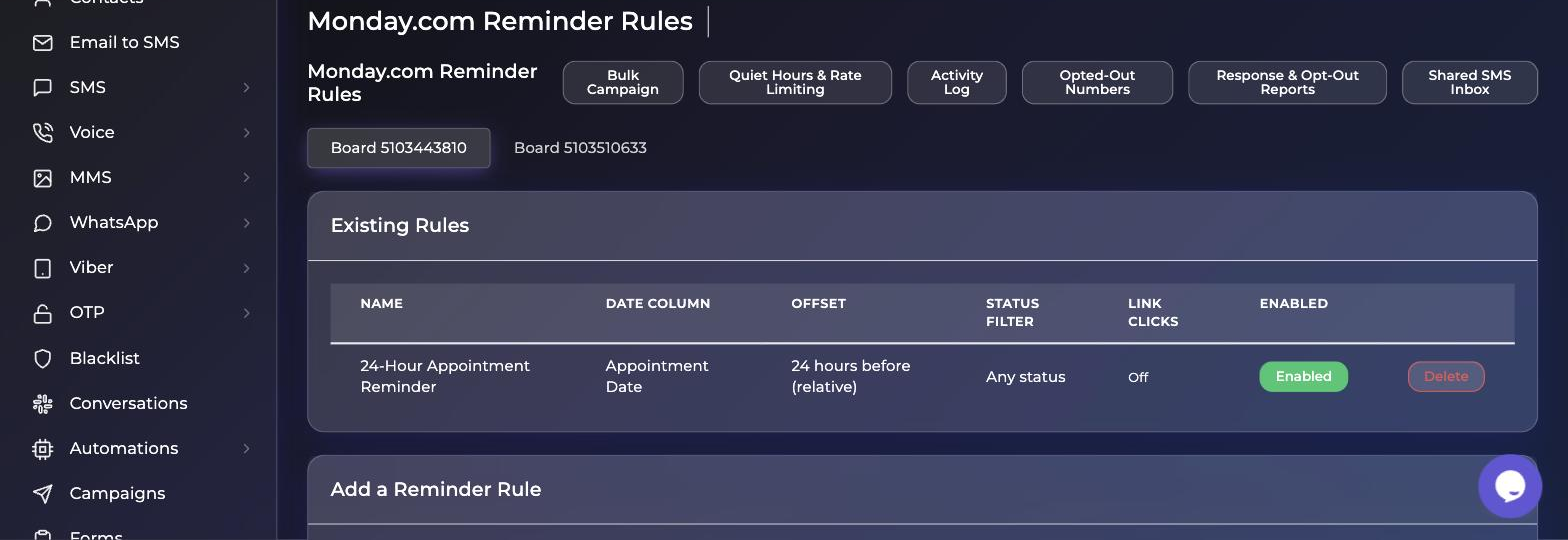
Open Monday.com Reminder Rules
From your DataFlows account, open Monday.com Reminder Rules and pick a connected board.
Choose the date and offset
Choose the date column to watch and an offset: relative (for example 24 hours before) or a fixed time of day.
Add filters and business hours
Optionally add a status filter so it only fires for items in the right stage, and set business-hours or weekday exclusion so nothing sends at 2am.
Write your message template
Use {Column Title} tokens. They resolve against the item's real column values at send time.
Pick a sender and save
Pick a sender from your connected numbers or Sender IDs, and save. The rule runs on its own from here.
Conditional SMS Rules
Fire a text the moment a column changes (a Status moves to "Ready for pickup", a Dropdown flips to "Overdue") instead of watching a date.
Open Monday.com Conditional SMS Rules
Open Monday.com Conditional SMS Rules and pick a board.
Build your conditions
Build one or more conditions against Status, Dropdown, Numbers or Checkbox columns, combined with ALL or ANY matching.
Write the message and pick a sender
Write the message template and pick a sender. It uses the same token syntax as reminders.
Bulk SMS Campaigns
Send to a filtered segment of a board at once, such as every overdue invoice or every lead at a certain stage, with delivery and failure tracking from the moment it sends.
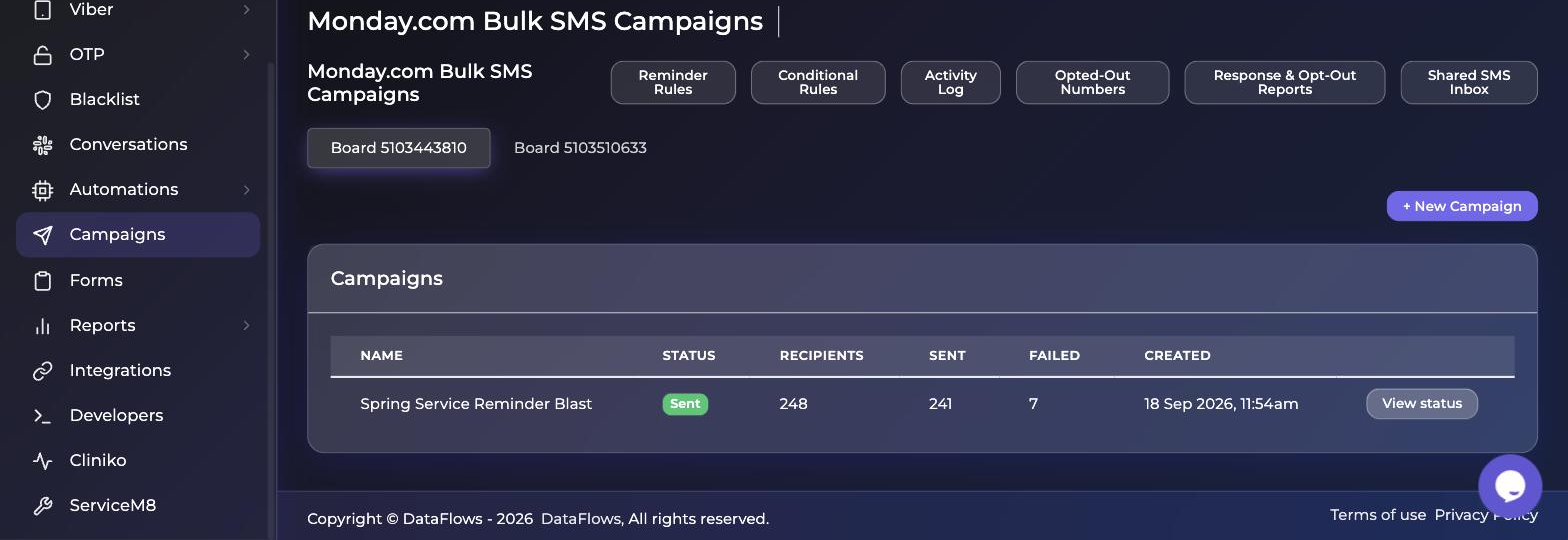
Choose a board and filter
Open Bulk Campaigns, choose a board, and set your filter conditions. It's the same condition builder as conditional rules.
Preview before you send
Preview the matching recipient count and your message template before anything sends.
Send
Delivery runs in bounded waves, and quiet hours and your account's rate limit are respected automatically.
Track the results
Check the campaign's status page for sent, failed and (if enabled) click counts.
AI Replies & Automation
Every reply to a DataFlows SMS is automatically classified by intent (confirm, cancel, reschedule, question or complaint) with a confidence score. You decide what happens next.
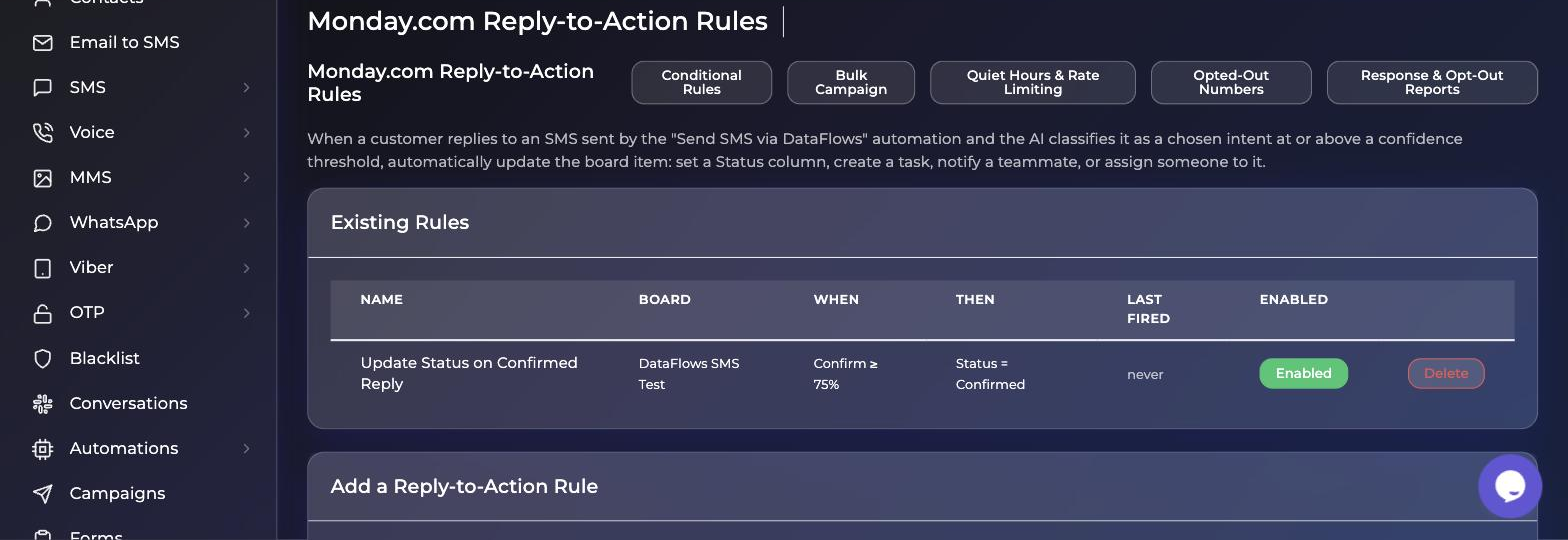
Open Monday.com Reply-to-Action Rules
Open Monday.com Reply-to-Action Rules and pick a board.
Choose a trigger
Match a specific intent at or above a confidence threshold, or catch anything the AI classifies with low confidence, which is a useful safety net for replies worth a human's attention.
Choose the action
Update a status column, create a task, notify a teammate, or assign someone to the item.
One Inbox for Every Board
See every SMS conversation across every board in one place, something monday's own per-item Updates can't show you. Each thread carries its AI-classified priority.
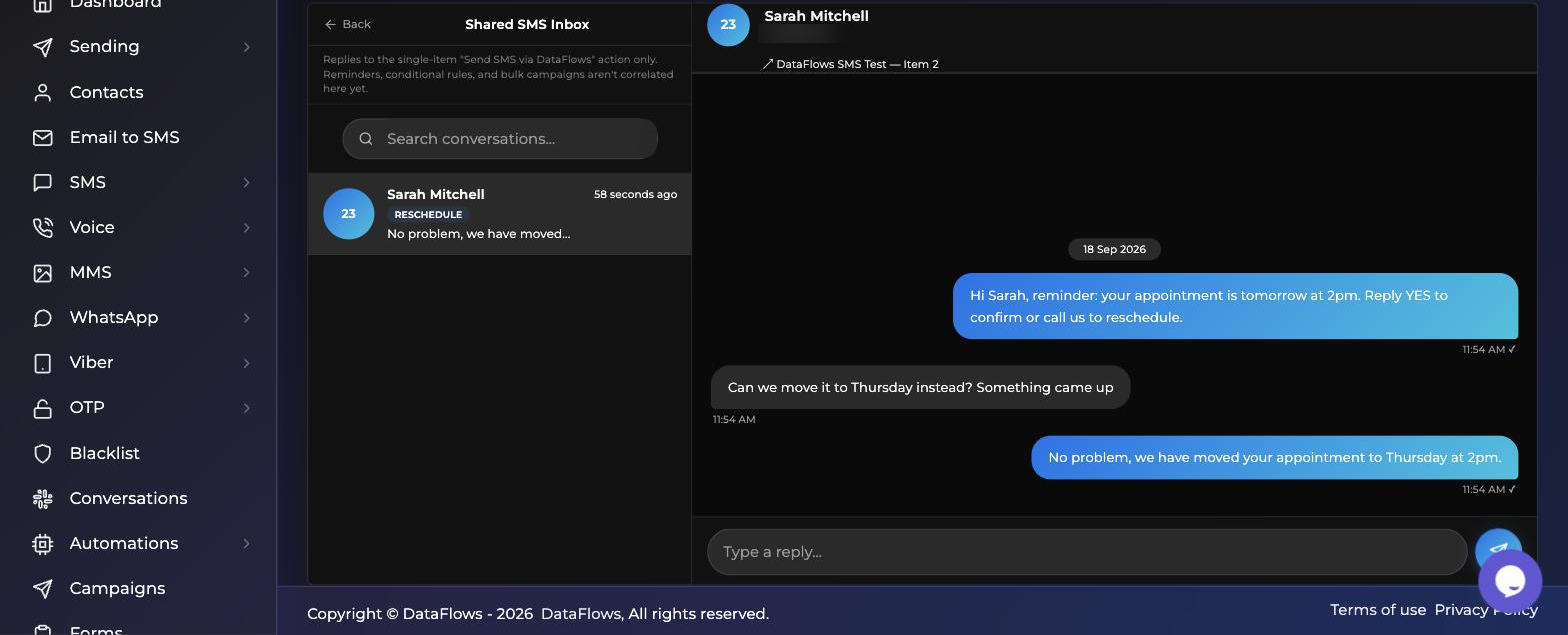
Open the Shared SMS Inbox
Open Shared SMS Inbox from the header links on any of the Monday.com pages.
Pick a conversation
See the full thread, its priority badge, and a live link back to the monday.com item it's tied to.
Reply from the inbox
Your reply sends as a real SMS from the same number the conversation started on.
Trackable Links
Know when a link you texted actually gets clicked (a quote, an invoice, a booking page) without leaving monday.
Turn on Track link clicks
On a reminder rule, conditional rule or campaign, turn on Track link clicks.
Pick a Text column
Choose a Text column to hold the click status. DataFlows writes it automatically.
Watch the clicks come in
Any link in your message is shortened and tracked. The column updates the moment someone taps it, showing a running click count.
Quiet Hours & Compliance
Account-wide guardrails that apply across every reminder, conditional rule and campaign. Set them once.
| Setting | What happens |
|---|---|
| Quiet hours | Set a sending window in Quiet Hours & Rate Limiting. Anything that would send outside it waits until the window reopens instead of sending late or early. |
| Rate limiting | Cap messages per hour or per day across the whole account. This is useful when a large campaign and your regular reminders run the same day. |
| Opt-outs | STOP, UNSUBSCRIBE and similar replies are handled automatically, platform-wide. An opted-out number is blocked from every future send, with no setup required. |
| Reporting | Response & Opt-Out Reports shows account-wide reply-time stats and opt-out activity, broken down by board. |
What You Need
Common Questions
Over OAuth. You install the DataFlows SMS app, approve the permissions it needs (reading board data, writing back to columns you configure, posting Updates and creating webhooks), and select the boards to connect. The installation stays linked to those boards with no re-authenticating per feature.
No. Reminders, conditional rules, campaigns and reply automation are all scoped per board, so you choose which boards use which features.
No. The first pass silently establishes a baseline, so only items that start matching after the rule exists will actually text someone.
STOP, UNSUBSCRIBE and similar replies are handled automatically across the whole platform. An opted-out number is blocked from every future send, with no setup required.
For now, replies to messages sent with the single-item Send SMS via DataFlows action. Reminders, conditional rules and campaigns aren't correlated into the inbox view yet, although the AI classification of replies still works.
Yes. Set a sending window in Quiet Hours & Rate Limiting and anything that would send outside it waits until the window reopens. Individual reminder rules can also apply business-hours or weekday exclusions.
Email [email protected] and our team will get back to you.
Related Integrations
Ready to Connect?
Connect DataFlows to monday.com and start texting from your boards.